
Screen walkthrough · MacroMatrixFX
How to read a MacroMatrixFX pair analysis
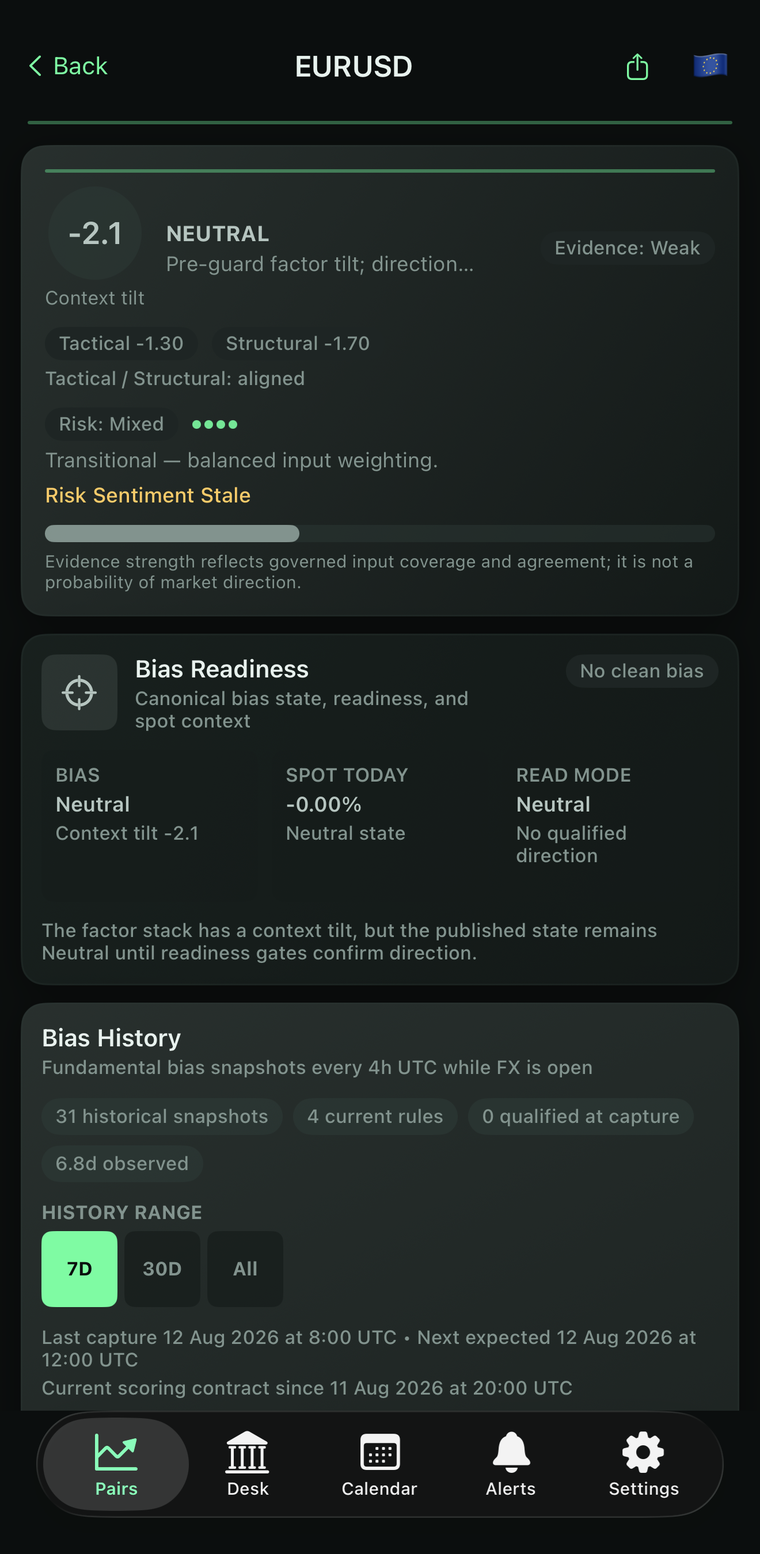
A negative score does not always mean a directional bias. Read the published state, evidence warnings and observation time together. This EUR/USD example shows why the large number is only one part of a fundamental research screen.
1. Separate the pair, price and model reading
EURUSD is the instrument shown. The screen distinguishes a context tilt of -2.1 from a spot-today percentage and the published bias. Those values answer different questions: a model's interpretation is not the same unit as a percentage price change.
Do not read -2.1 as a forecast return, a probability or an instruction. The visible published bias is Neutral, and the readiness panel says No clean bias. The screen itself explains that the factor stack has a tilt while the published state remains neutral until readiness gates confirm direction.
2. Read agreement alongside its qualifications
The tactical reading is -1.30 and the structural reading is -1.70, with the display marking them aligned. Yet the same screen labels the evidence Weak and the risk Mixed. Agreement between two displayed summaries does not remove the other qualifications.
Risk Sentiment Stale is an explicit warning. Keep that warning in the research note rather than reporting the tilt alone. This image does not establish the age of that input, the gate thresholds or which individual rule determined the final state. Those details require the applicable model record, not a guess from the colour of a badge.
3. Do not turn evidence strength into odds
The on-screen explanation says evidence strength reflects governed input coverage and agreement; it is not a probability of market direction. A longer evidence bar would therefore not, by itself, establish a higher measured chance of a price rise or fall.
When comparing pairs, also consider shared currency exposure. Several pairs containing the same currency are not automatically several independent pieces of evidence. Preserve disagreement, stale inputs and unknowns instead of compressing them into a single conviction statement.
4. Treat history as a dated record
The history panel shows 31 historical snapshots, four current rules and zero qualified at capture, alongside a last-capture time and the start of the scoring contract. These are the labels in this historical example, not current totals or performance statistics.
A useful note for this screen is: EURUSD; visible history timestamp 12 August 2026, 08:00 UTC; published Neutral; negative context tilt; weak evidence; stale risk sentiment; exact gating cause unknown. That is a reproducible reading of the evidence, not a trade recommendation.
Your review checklist
- Record the pair and the timestamp attached to the observation, not just the phone clock.
- Separate the context tilt, published bias and spot-price change.
- Keep evidence, freshness and conflict warnings beside the score.
- Record unknown rules or inputs as unknown; do not infer accuracy from the display.
Use the free companion worksheet to keep observations and unknowns together.
Explore the app
Explore MacroMatrixFX, its features and current access options. Check the store for platform availability, eligibility and renewal terms before subscribing. This guide requires no subscription.
Related reading: Fundamental currency strength versus price strength.
Evidence and corrections
This is a first-party explanation by the app developer, based on the screenshot displayed above. It is not an independent review or a test of predictive accuracy. Missing dates, model rules or outcomes are not inferred from the image. Send a correction if your version differs.